Manual, Handwheel & Homing
Bu içerik henüz dilinizde mevcut değil.
The MANUAL screen is where you move the machine yourself. It carries four tabs:
| Tab | For |
|---|---|
| JOG | moving an axis by button or handwheel, and setting part zero where you stand |
| HOME | referencing the machine |
| MACROS | the canned moves your machine builder wired in: park, warm-up, go to safe point |
| RECOVERY | getting back onto the path after you jogged away from a paused program |
The SPEED readout in the top right is the actual speed of the fastest-moving linear
axis, measured. It is not the speed you selected. It reads 0.0 when nothing is
moving, whatever setting is lit.
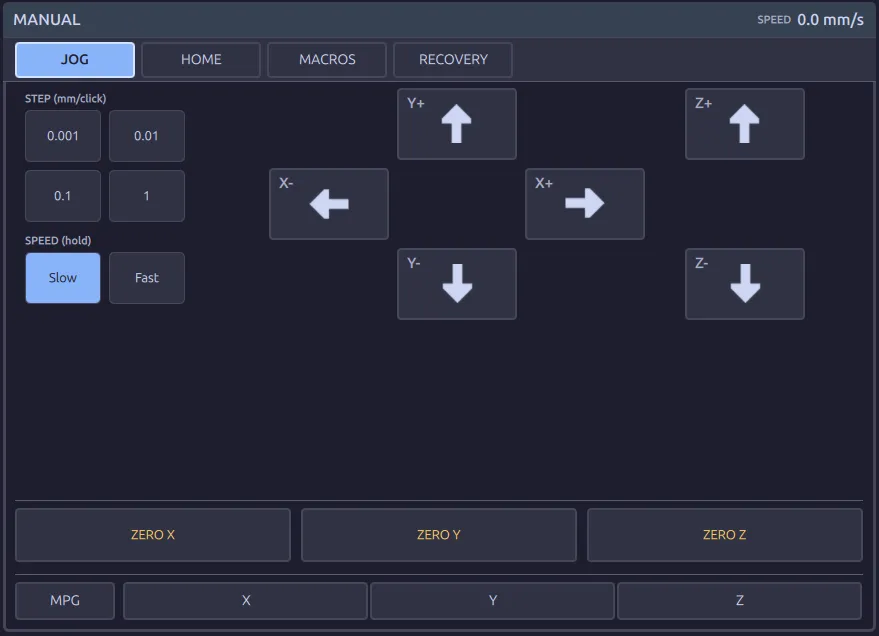
The six buttons are one setting
Section titled “The six buttons are one setting”STEP and SPEED look like two groups. They are one: whichever of the six you press
is the mode. Selecting 0.1 turns Slow off, and selecting Fast turns the step
sizes off.
| Lit | The arrows do |
|---|---|
0.001 0.01 0.1 1 | one press, one step of that many millimetres |
Slow Fast | move while held, stop when you let go |
Holding an arrow in a step mode does not repeat the step. Press again for the next one.
Every step runs at the slow speed, whichever step size you pick. Fast applies to
held jogging only. How fast slow and fast actually are is set per axis on your machine.
At power-up the machine comes up in Slow.
The handwheel
Section titled “The handwheel”MPG turns the handwheel on, and X Y Z choose which axis it drives.
The wheel only moves the machine when a step size is selected. In Slow or Fast
the wheel is dead. Check that first when the wheel turns and nothing
happens. With a step selected, one detent is one step: on 0.01, ten clicks is a
tenth of a millimetre.
While the wheel is driving an axis, that axis’s arrow buttons do nothing. The other axes still jog normally.
ZERO X, ZERO Y, ZERO Z
Section titled “ZERO X, ZERO Y, ZERO Z”These set part zero at the position the axis is standing in, for that axis, in the work offset the program is currently using.
That is the whole touch-off: bring the tool onto the face, press ZERO Z, and Z zero is
now that face.
Three things to know before you use them:
- They write the live work offset immediately. No dialogue, no confirmation, no undo. The next program you run cuts from the number you just made.
- They change one axis only, the one named on the button.
- They are ungated. Anyone standing at the panel can press them.
The gap between the arrow keys and this row is deliberate: it exists so that a hand
jogging in a hurry does not land on ZERO.
To type a number instead of zeroing where you stand, such as a gauge height or a slip thickness, use Tool & Work Offsets.
What jogging will not do
Section titled “What jogging will not do”It stops at the travel limits. The axis decelerates smoothly and stops there; it is not an alarm and nothing is wrong. Armed protection zones stop it the same way.
Jog is refused while a program is running. Feed hold first. A feed-held program does not block jogging, which is exactly what the RECOVERY tab is built on.
An axis that has not been referenced is not clamped. The limits are not known yet, so nothing stops you at them. This is intentional: it is what lets you jog off a limit switch after tripping one. Watch the machine, not the screen, until it is homed.
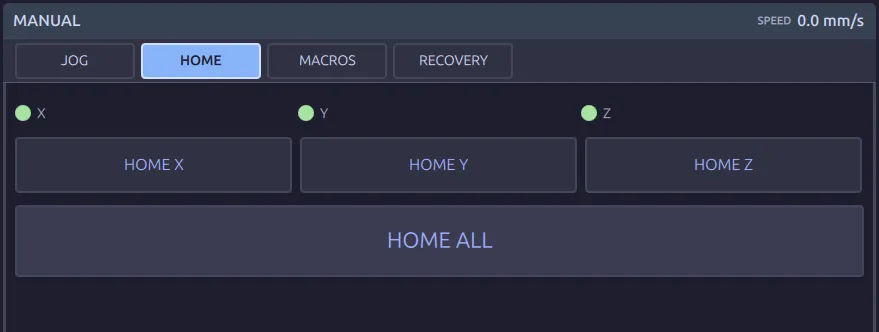
A lamp per axis: green means that axis is referenced.
HOME X HOME Y HOME Z reference one axis. HOME ALL runs the whole sequence.
The order is set by your machine, not chosen here. Typically Z clears first so the tool comes up out of the work before anything moves in the plane. Axes that share a step in the sequence go together.
Homing an axis that is already green is allowed and does no harm; re-referencing is how you clear any doubt after a crash.
The sequence aborts on an axis fault, on emergency stop, or if drive power drops. It tells you it aborted; nothing is left half-referenced without saying so.
Jogging before homing
Section titled “Jogging before homing”You can jog an unreferenced machine, deliberately, so a tripped limit is recoverable. You cannot run one: AUTO, MDI and macros all require the machine to be referenced first. If cycle start is refused on a cold machine, this is usually why.
The HOME tab needs setter access. Below that level the tab is not shown at all.
MACROS
Section titled “MACROS”A fixed set of buttons, of which only the ones your machine builder wired in appear:
TOOL CHANGE, PARK, WARMUP, GO SAFE.
Each one runs a routine held in the machine, not a program you loaded. A button greyed out means the machine is not currently willing to run it, usually because something else is busy.
On most machines only GO SAFE is wired: it sends the machine to the safe point the
builder set, so you can get clear without jogging three axes by hand.
RECOVERY
Section titled “RECOVERY”The program is paused part way through a cut, you jogged the tool away to look at something, and now you have to get back to exactly where it was.
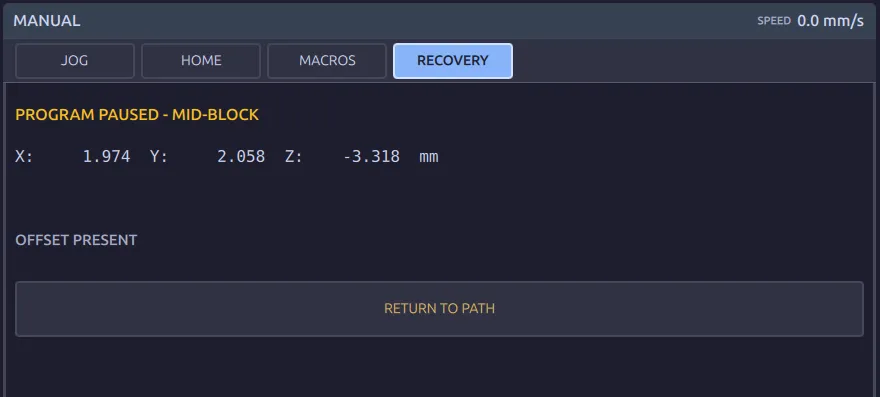
The tab tells you three things:
| Shown | Means |
|---|---|
PROGRAM PAUSED - MID-BLOCK | there is an interrupted program with a held point to return to |
X … Y … Z … | how far you have moved off that point, per axis, in mm |
AT INTERRUPT POINT / OFFSET PRESENT | whether you are back on it, or still away from it |
RETURN TO PATH moves the machine back to the interruption point. The control owns that
move, so you do not have to work out the order or drive it by hand.
Then release HOLD and press cycle start, and the program carries on from where it
stopped.
Cycle start is refused while you are off the path
Section titled “Cycle start is refused while you are off the path”A start from where you happen to be standing would carry on cutting from the wrong place,
so the control refuses it until you have returned.
OFFSET PRESENT is telling you exactly that: press RETURN TO PATH first.
The screen’s own reading of “back on the point” is a little looser than the check the control makes before it will resume, so treat the display as guidance and the refusal as the authority.
Where to go next
Section titled “Where to go next”- Tool & Work Offsets: typing offsets rather than zeroing where you stand.
- Part Zero with a Probe: the same job with a probe, and to the accuracy of a probe.
- MDI: one block, run by hand, when jogging is not enough.