Status Monitor
The status monitor is the machine at a glance, sized to be read from a distance. Leave it up on a machine that is running unattended.
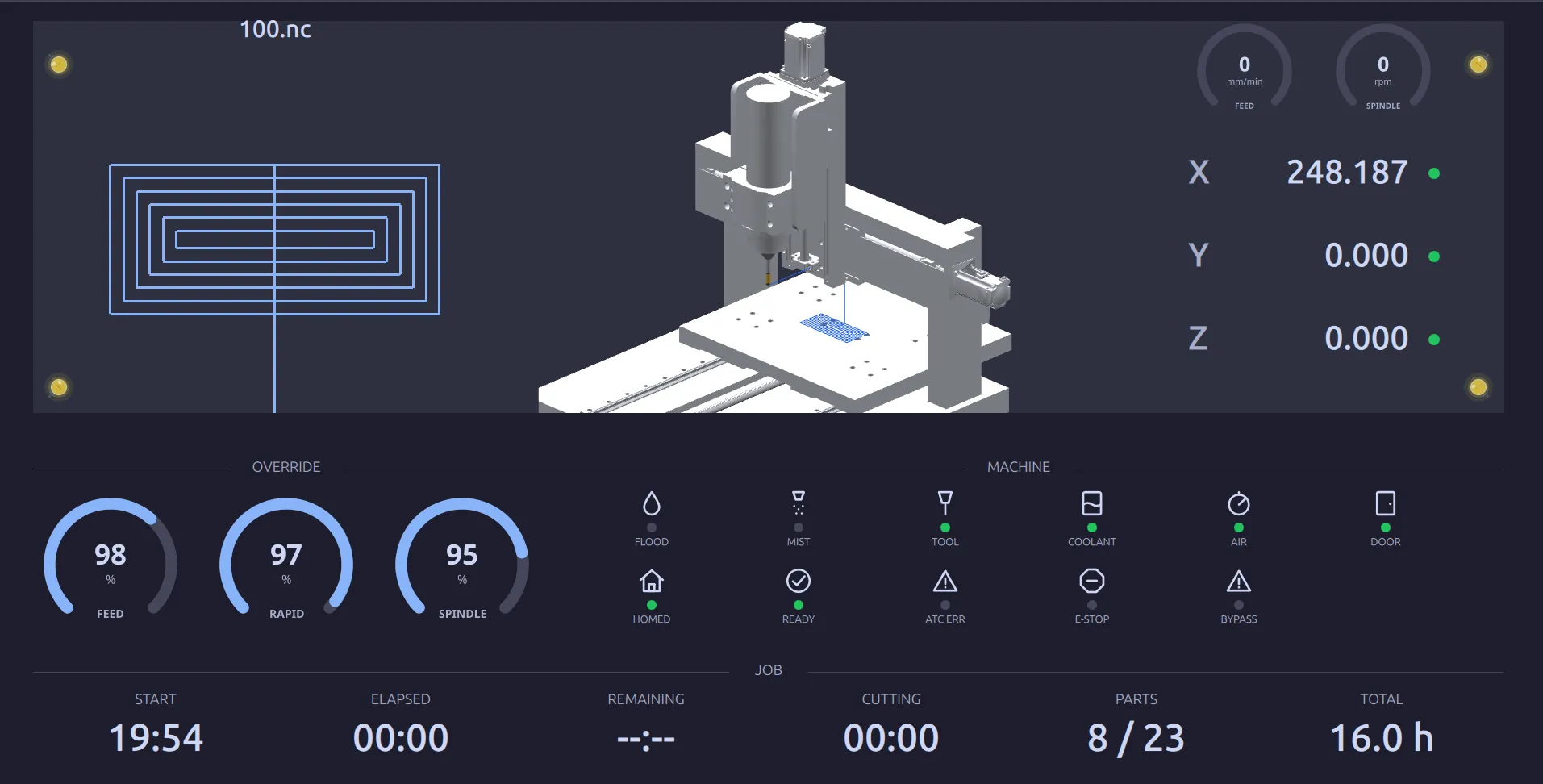
It also comes up on its own: when nothing is touched for a set time, the panel hands the
screen over to it. That delay, and turning it off, is on the DISPLAY screen.
What it shows
Section titled “What it shows”Top: the program that is running, its path, and the machine drawn as it stands. Alongside: actual feed, actual spindle speed, and the axis positions.
Override: the three dials, reading what they are set to. See Overrides & Run Options.
Machine: a lamp per condition: FLOOD, MIST, TOOL, COOLANT, AIR, DOOR,
HOMED, READY, ATC ERR, E-STOP, BYPASS. Green is on or healthy. This row is the
quickest way to answer “why will it not start” from across the shop. An unlit READY,
a lit E-STOP or an open DOOR shows without walking over.
Job: when the job started, how long it has been going, what is left, how much of that was cutting, the parts count, and the machine’s total hours.
What it is not
Section titled “What it is not”It is a display. Nothing on this screen commands the machine: there is no start, no hold, no override to drag. Everything here is a reading.
Where to go next
Section titled “Where to go next”- Production Counts: the counter behind the parts figure.